Containers were not always a common choice for app deployment, but as organizations adopted containerization, it brought a fundamental shift to infrastructure (all while HAProxy sat at the traffic layer, adapting as the environments changed underneath it).
Containers entered the mainstream in 2013 with the launch of Docker, posing challenges for traditional production environments already comfortable with the isolation provided by virtual machines.
Operational complexity, security concerns, and a cultural shift were just some of the obstacles containerization presented.
Virtual machines had already established themselves as the foundation of virtualization following the milestone release of VMware’s first virtual x86 product in 1999, and still remain a key component across data centers and clouds for those seeking isolation and predictable performance. They offered a familiar model that teams trusted, which made the initial leap to containers daunting.
Despite these hurdles, the benefits of containers (agility, scalability, and efficient resource use) outweighed the challenges, resulting in widespread adoption.
If you blinked, you might have missed the uptake of containerization, but it’s no exaggeration to say it's become a mainstay of software deployment and a core component of microservices and cloud architectures. By 2027, running containerized applications in production will become standard practice for more than 90% of global enterprises, according to Gartner’s “The CTO’s Guide to Containers and Kubernetes”.
This increasing demand for containers stems from their unique ability to resolve an organizational conflict between prioritizing infrastructure stability and application speed.
Infrastructure teams strive for stability and often minimize changes to ensure high availability and performance. Conversely, application teams need to move fast and release updates to production as quickly as possible to stay competitive in the market.
Containers allow an organization to meet both of these needs, providing an abstraction layer that allows the underlying network infrastructure to remain rock-solid while enabling application teams to deploy at whatever speed the business requires.
In this blog post, we’ll explore the differences between containers and virtual machines, the best use cases for each, and how HAProxy’s application delivery solutions integrate with both models.
What is a virtual machine (VM)?
A virtual machine (VM) is quite literally a virtual machine. Think of it as a computer within a computer — software that emulates a full system, complete with its own operating system (OS) and applications, all running on top of your physical hardware.
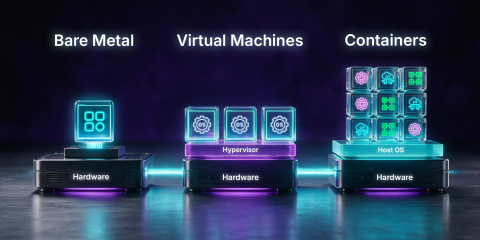
A virtual machine is allocated a portion of the host system’s physical resources and operates independently of the host and hosted systems. This means that each virtual machine includes a complete OS kernel, virtual hardware such as a CPU, memory, and storage, and its own set of applications.
Resource allocation is delegated through a hypervisor — a virtual machine monitor that sits between the hardware and multiple VMs, ensuring each virtual machine runs independently and is isolated from the others in its workload.
There are two types of hypervisors:
Bare-metal hypervisor: Offers high performance and strong isolation by running directly on the hardware, eliminating the need for an intervening host OS.
Hosted hypervisor: Runs on top of conventional operating systems — convenient for development and testing, but incurs extra overhead since it relies on the host OS.
In both bare-metal and hosted hypervisors, virtual machines provide strong workload isolation. If one virtual machine fails or is compromised, other virtual machines running on the same host are not directly affected. This isolation acts as a security boundary, enforcing hardware-level isolation.
A virtual machine runs anything you’d run on a physical computer. This includes containers, which in many cases run on top of VMs, suggesting that these two forms of virtualization aren’t in competition but can complement one another. Virtual machines are best for applications with complex, tightly coupled components, handling different operating systems, or circumstances that necessitate complete control and strong isolation.
What is a container?
When it comes to containers, we need to think smaller. We’re talking lightweight, portable software units that wrap an application and all its dependencies into a package that runs on a shared host operating system. While a virtual machine provides hardware-level virtualization, a container provides OS-level virtualization that shares the host’s kernel, isolating its processes and resources.
A container often includes only the application and the minimum services needed to run it, including its own file system, libraries, and binaries. This makes containers highly portable and faster to start (often in milliseconds to seconds) than booting virtual machines, which carry the entire operating system along with multiple applications.
This high level of flexibility is fully realized through multi-arch containers, in which a single container image supports multiple CPU architectures. Because of this design, these images can run seamlessly across diverse hardware setups, provided a compatible container runtime is present.
Containers make all of this possible with a container runtime (software that uses operating system features to handle isolation and resource management). Container runtimes leverage Linux kernel features, including namespaces and control groups (cgroups), to achieve process-level isolation:
Namespaces: Isolate system resources, including process IDs, network interfaces, and file systems, so that a process operates within its own environment, independent from the resources designated for another process.
Control groups (cgroups): Limit and account for a container’s resource usage, including CPU, memory, and I/O, allowing you to allocate or limit resources for a container and promote fair use to prevent any container from starving the host of resources.
The container runtime handles all the heavy lifting. It retrieves container images, unpacks them, sets up the necessary namespaces and cgroups, and initializes the containerized process. It essentially bridges the gap between your container image and the kernel-level isolation features, allowing everything to function as the lightweight, isolated process we want. Then user-facing orchestration tools help you deploy, scale, and manage these containers wherever you need them.
When you put it all together (the kernel-level isolation, runtime management, and flexible networking), you get a lightweight but powerful way to build and scale applications. It's that combination that makes containers so useful.
Virtual machines vs containers: differences
When comparing the two, containers offer speed, scalability, and portability through lightweight OS-level virtualization, while virtual machines provide stronger isolation, multi-OS flexibility, and robust compliance. Many organizations combine both approaches to strike a balance between performance and security in hybrid environments.
Feature | Virtual Machine (VM) | Container |
Virtualization | Hardware-level via hypervisor | OS-level via namespaces/cgroups |
Isolation | Strong (each VM has its own kernel/OS) | Process-level (shared kernel) |
Operating system | Runs its own full guest OS; does not need to match the host operating system | Does not carry a full OS; only runs the application and minimum required services |
Boot time | Seconds to minutes (full OS boot) | Milliseconds to seconds (just the app starts) |
Resource overhead & allocation | High overhead (full guest OS, larger disk images). Strict allocation ensures a guest machine cannot unfairly exceed its designated share. | Low overhead (shared OS, only application files and libs). Significantly less intensive resource demands. |
Portability | Hardware/OS agnostic via virtualization, but tied to VM format | Very high (multi-arch container images run anywhere a compatible runtime exists) |
Deployment environments | Deployed via the hypervisor, breaking a single physical server into multiple instances | Highly versatile; runs on bare-metal servers, cloud infrastructure, and even inside virtual machines |
Networking | Virtual NICs on virtual networks or VLANs; uses standard IP routing | Various modes (bridge, host, overlay, underlay) |
Scalability | Good (cloud scales VM instances), but each new VM is heavy | Excellent (orchestration can spin up many containers quickly) |
Security | Strong sandboxing by the hypervisor, but each OS needs updates and patches | Weaker isolation (shared kernel); requires container-specific hardening (non-root, seccomp, scanning) |
When to use a virtual machine (VM) vs a container?
Virtual machines and containers do not replace each other; they complement each other and excel in different scenarios.
Use virtual machines when you need strong isolation or applications that require a full operating system. They’re well-suited for legacy software, applications with specific OS dependencies, and situations where regulatory compliance demands strict separation.
The deeper isolation that virtual machines provide is important in multi-tenant environments, where compromising one VM won’t affect others. Virtual machines also work well for stateful applications, hardware-specific drivers, or when you need to run multiple operating systems on the same hardware.
Use containers when you need lightweight, fast deployment, and easy scaling for microservices. They’re ideal for stateless applications, APIs, and cloud-native services.
Containers enable you to break down applications into independent components that start in seconds and can be orchestrated using tools like Kubernetes. This makes containers ideal for application delivery, dynamic workloads, and environments that utilize multiple programming languages.
Containers also maximize resource efficiency — a single host can run far more containers than VMs, reducing costs for parallel workloads.
The reality is that organizations often run hybrid environments: virtual machines for steady-state workloads and compliance-heavy systems, and containers for elastic, cloud-native applications. In many situations, containers even run on virtual machines, combining VM-level isolation with the agility of containers.
HAProxy One is designed to perform consistently across all of these models, providing high-performance traffic management for virtual machines and containers.
HAProxy One for hybrid infrastructure
HAProxy One, the world’s fastest application delivery and security platform, manages application traffic across both models from a single control plane. The same routing logic, WAF rules, bot management, and observability that protect your containers also apply to your VMs and bare-metal servers. This means one system that treats pods, VMs, and servers as equally reachable backends.
HAProxy Fusion, the platform’s scalable control plane, connects to your Kubernetes clusters and service registries like Consul and Consul Enterprise, discovering pod and VM IPs in real time and pushing that information to HAProxy Enterprise, the gateways sitting at the edge of your network. HAProxy Enterprise load balances directly across containers and VMs simultaneously. Security policies are defined once and propagate to every gateway. Observability converges into a single interface.
When your infrastructure spans containers, VMs, and bare metal, you need a consistent networking layer that treats them all the same way and handles both north-south and east-west traffic. HAProxy Technologies calls this architectural pattern the Universal Mesh: a model that discovers and routes to any object your infrastructure exposes and enforces security at the boundary, no matter whether you’re running containers, virtual machines, or both.
Conclusion
Virtual machines and containers each bring unique strengths, and HAProxy One provides a unified platform to manage traffic across both. By simplifying architecture, reducing operational complexity, and supporting consistent traffic management and security policies, HAProxy One helps organizations deliver applications faster, more reliably, and at any scale — no matter the level of virtualization.
Frequently asked questions
A virtual machine virtualizes hardware, giving each instance its own full OS and kernel via a hypervisor. A container virtualizes at the OS level instead, sharing the host's kernel while isolating processes through namespaces and cgroups. That's why VMs offer stronger isolation while containers offer a lighter, faster footprint.