
At a glance
The issue: A heap buffer overflow in OpenJDK's AVX-512 base64 decoder, tracked as CVE-2026-114938, affects OpenJDK 17, 21, 25, and 27.
Severity: CVSS 8.1, HIGH, as rated by Oracle.
Status: Public proof-of-concept exploits exist for Keycloak, Jira, Confluence, Artifactory, Jenkins, and PingFederate.
HAProxy protection: HAProxy Technologies products are not affected, because HAProxy does not run a JVM. HAProxy Enterprise WAF and frontend ACLs block the attack for Java applications behind HAProxy.
Immediate action: Patch the JDK to a fixed build. If you can't do that yet, add the ACLs below.
Java4Shell vulnerability
HAProxy Technologies products are not affected by Java4Shell (CVE-2026-114938), because HAProxy does not run a JVM. If your applications are written in Java, this post covers both ways to protect them: patch the JDK, or block the attack at the proxy.
Java4Shell is a heap buffer overflow in OpenJDK's AVX-512 base64 decoder. A padding-length underflow produces a full 64-byte write mask, so the store lands 62 bytes past the end of the heap buffer. The flaw needs no credentials: it triggers wherever a Java service decodes base64 on a hot path, most obviously in the Authorization header. Oracle rates it CVSS 8.1, HIGH.
Public demonstrations show pre-authentication remote code execution against Keycloak, Jira, Confluence, Artifactory, Jenkins, and PingFederate, so the exploitation barrier is low and the tooling is already circulating.
Patch first, because that is the actual remediation and it costs nothing. If you can't patch this week, block the attack at the proxy while you work through your fleet. The ACLs below work on any HAProxy. The per-argument WAF rules need HAProxy Enterprise.
How the overflow works
The decoder processes input in 64-byte SIMD blocks and writes the padded tail with a masked store. The fast path is only entered once a full block has been consumed, so the trigger is a run of at least 64 base64 characters followed by a malformed padding tail, such as =, ==, or AB=.
On that tail the computed output length is zero. The padding decrement underflows it. BZHI treats the underflowed index as unsigned, so the write mask comes back full and all 64 bytes land where only a few were expected. Java then throws IllegalArgumentException, but by that point the write has already happened.
The length matters because it decides which code path runs. A short padding-only value such as = or == stays on the scalar path, which does not have the bug. Only a value long enough to fill a SIMD block reaches the masked store,
which is why the protection rules in the next sections match a long base64 run rather than a bare padding character. Older JDK 17 builds use 128-byte blocks, so their threshold is twice as high.
Affected versions
OpenJDK 17.0.6 through 17.0.21: update to 17.0.21.1 (Oracle) or the vendor's fixed build
OpenJDK 21.0.13 and earlier: update to 21.0.13.1
OpenJDK 25.0.5 and earlier: update to 25.0.5.1
OpenJDK 27.0.1 and earlier: update to 27.0.1.1
Java 11 is not affected: the AVX-512 intrinsic is not present
Java 17.0.0 through 17.0.5 are not affected: they predate the intrinsic
Oracle GraalVM for JDK 17.0.21.0.3, or 21.0.13.0.3 and earlier
Oracle GraalVM Enterprise Edition version 21.3.20.0.3 and earlier
Oracle's advisory is the authoritative list, and vendor builds from Temurin, Corretto, and Zulu typically follow within days, so check your distribution's release notes.
Please see NIST CVE https://nvd.nist.gov/vuln/detail/cve-2026-114938 for more details
Recommended actions
Fix or disable the intrinsic in OpenJDK
Patch to the fixed builds listed above, or add -XX:-UseBASE64Intrinsics as a stopgap, which disables the vulnerable code path everywhere at the cost of a slower base64 decoder. That is worth a few percent on base64-heavy hot paths and invisible elsewhere. -XX:UseAVX=2 works too, but only on x86-64, so it is not available on ARM.
Protecting Basic Authentication, and Bearer tokens
There are two different methods to protect authentication headers, depending on whether you are using Basic, or Bearer authentication. Basic authentication is easier, while Bearer depends on our ability to verify the signature of the token, thus verifying it contains valid base64.
Protecting Basic Authentication
Use HAProxy ACL to read the Authorization header and ask what scheme it uses; during an attack the scheme is empty, because the base64 doesn't decode, so the request can be blocked.
The ACL below blocks this attack for Basic authentication:
acl auth_hdr     req.hdr(Authorization) -m found
acl basic_scheme req.hdr(Authorization) -m beg -i "Basic "
acl auth_parsed  http_auth_type -m found
# Tag the event for logging and SIEM correlation
http-request set-var(txn.sec_actiontaken) str(Auth:Java4Shell) if auth_hdr basic_scheme !auth_parsed
http-request deny deny_status 403 if auth_hdr basic_scheme !auth_parsed
Valid credentials of any length and padding will parse fine, while attacks will be blocked.
A real request would pass through:
curl -u user:pass https://your-app/While the wrong base64 will be blocked:
curl -H 'Authorization: Basic =' https://your-app/Protecting JWT and Bearer authentication
The ACL above covers HTTP Basic only because http_auth_type returns the scheme for any Bearer header without validating the payload, so the deny rule would never run.
You can use HAProxy’s native JWT verification capability to verify the Bearer tokens. While this would be normally used for authentication, you can choose to do so, or to let your final backend application to continue authenticating, while HAProxy only verifies the signature, which would confirm the payload is a valid base64. Invalid base64 would never pass the signature verification.
http-request set-var(txn.bearer)  http_auth_bearer
http-request set-var(txn.jwt_alg) var(txn.bearer),jwt_header_query('$.alg')
acl is_bearer req.hdr(Authorization) -m beg -i "Bearer "
acl alg_ok    var(txn.jwt_alg) -m str RS256
acl sig_ok    var(txn.bearer),jwt_verify(txn.jwt_alg,"/path/to/pubkey.pem") -m int eq 1
# Tag the event for logging and SIEM correlation
http-request set-var(txn.sec_actiontaken) str(Auth:Java4Shell) if is_bearer !alg_ok
http-request set-var(txn.sec_actiontaken) str(Auth:Java4Shell) if is_bearer !sig_ok
http-request deny deny_status 403 if is_bearer !alg_ok
http-request deny deny_status 403 if is_bearer !sig_ok
Protecting all other payloads, including bodies, and arguments
You can block requests with invalid base64 using HAProxy Enterprise WAF. You write the rule for each argument that accepts base64, in a frontend or listen section with mode http. While the previous ACLs work on HAProxy Community and HAProxy Enterprise; the WAF rules need HAProxy Enterprise.
Option 1: Using HAProxy Enterprise WAF / ALOHA
You have to write protection per argument, because there is no universal rule. Universal rules provided by some other sources online will end up blocking legitimate traffic, as they might incorrectly assess strings that are 65 characters long, and end with an equal sign, as base64.
Start by listing which headers and query parameters your application accepts base64 in, then write a rule for each one.
For example, to validate correct base64 for a URL argument called “id”, write a rule like this:
BasicRule "str:__java4shell__" "msg:java4shell invalid base64 in query parameter" "mz:$ARGS_VAR:id" "t:b64_dec_s" "s:BLOCK" id:98003;The t:b64_dec_s transform decodes the value before inspection; when decoding fails, the built-in rule 900 ("invalid base64 encoding") fires and blocks the request.
The key to protection is using a strict decoder, if your backend is lenient about base64, test the rule against your own traffic before you ship it.
For the full rule syntax and guidance on choosing each argument, see the matching rule documentation.
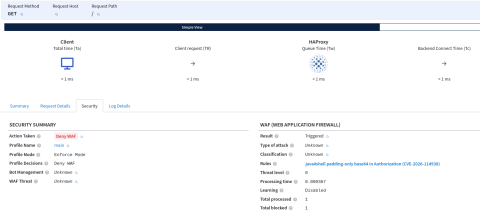
Request blocked by HAProxy Enterprise WAF by one of the rules.
The rules above work on both HAProxy Enterprise, and ALOHA. See our documentation for instructions how to update rules on HAProxy ALOHA https://customer-docs.haproxy.com/web-application-firewall/update-rules/#haproxy-aloha
Option 2: Using OWASP CRS rules
Instructions for creating custom OWASP CRS rules are available in the customer documentation: https://customer-docs.haproxy.com/web-application-firewall/rule-customization/customize-owasp-crs-rules/
If you are running the HAProxy Enterprise WAF already, adding these rules might not be necessary. Similarly to the previous rule, the following CRS rule would stop an attack in query string argument “query”:
# Query parameter carrying base64. Per-argument by design — there is no
# universal rule, so instantiate this once per base64 parameter.
SecRule ARGS:query "@rx ^[A-Za-z0-9+/]{0,2}={1,2}$"
  "id:98051,phase:2,deny,status:403,log,
  msg:'Java4Shell: padding-only base64 in state parameter (CVE-2026-114938)',
  tag:'CVE-2026-114938',tag:'attack-rce',severity:'CRITICAL'"
Additional defensive measures
Patch the source. Apply Oracle's builds, or your vendor's equivalent, as soon as they ship.
Watch your logs. A 403 from the ACLs above, or rule 900 firing in your WAF log, means someone is probing you.
Check for indicators of compromise. Watch your Java services for unexpected child processes and outbound connections, and for stack traces containing IllegalArgumentException that originate from the base64 decoder rather than from application validation logic.
Previously in this series
Three earlier posts covered the same shape of problem: a vulnerability in a decoder you didn't know you were running. In each case, a rule at the edge bought time while teams patched.
React2Shell (CVE-2025-55182)
Microsoft SharePoint (CVE-2025-53770 / CVE-2025-53771)
Protect yourself today
Patch this week if you haven't already, and add the rules in the meantime.
If you run Java services: patch to the fixed builds listed above. That is the only real remediation.
If you can't patch this week: add the ACLs above. They work on HAProxy Community and HAProxy Enterprise.
If you run HAProxy Enterprise: write the per-argument WAF rules and watch your WAF log for rule 900.
If you want to evaluate the HAProxy Enterprise WAF: start a free trial of HAProxy Enterprise.
Support
If you are an HAProxy customer with questions about this advisory, or about upgrading to a fixed build, get in touch with our support team.