Téléchargez les packages de performance officiels HAProxy
Optimisé pour les infrastructures modernes avec des bibliothèques cryptographiques de nouvelle génération.
Bénéficiez du répartiteur de charge logiciel le plus rapide au monde, préconfiguré pour votre distribution. Nous avons optimisé l'intégration de HAProxy 3.2+ avec des bibliothèques hautes performances comme AWS-LC, vous garantissant ainsi un débit et une efficacité optimaux dès l'installation.


HAProxy Repository Setup for Debian
Follow these instructions to configure your Debian system to use the official HAProxy package repository. Packages are available for AMD64 and ARM64.
1. Download and Store the Repository GPG Key
This key is used to verify the authenticity of the packages. The key is stored in a separate file to improve security.
# Create a directory for the key if it doesn't exist
sudo install -d -m 0755 /usr/share/keyrings
# Download the GPG key
sudo wget -qO /usr/share/keyrings/HAPROXY-key-community.asc https://pks.haproxy.com/linux/community/RPM-GPG-KEY-HAProxy
2. Add the Repository to Sources
This tells your system where to find the packages and which key to use for verification.
# Add the HAProxy repository for [[OS]] and HAProxy [[VERSION]]
echo "deb [signed-by=/usr/share/keyrings/HAPROXY-key-community.asc] https://www.haproxy.com/download/haproxy/performance/debian/ha[[VERSIONNUMERALS]] [[OSLOWERCASE]] main" | sudo tee /etc/apt/sources.list.d/haproxy.list
3. Update and Install HAProxy
Finally, update your package list and install the desired HAProxy package.
sudo apt-get update
sudo apt-get install haproxy-awslc
HAProxy Repository Setup for Ubuntu
Follow these instructions to configure your Ubuntu system to use the official HAProxy package repository. Packages are available for AMD64 and ARM64.
1. Download and Store the Repository GPG Key
This key is used to verify the authenticity of the packages. The key is stored in a separate file to improve security.
# Create a directory for the key if it doesn't exist
sudo install -d -m 0755 /usr/share/keyrings
# Download the GPG key
sudo wget -qO /usr/share/keyrings/HAPROXY-key-community.asc https://pks.haproxy.com/linux/community/RPM-GPG-KEY-HAProxy
2. Add the Repository to Sources
This tells your system where to find the packages and which key to use for verification.
# Add the HAProxy repository for [[OS]] and HAProxy [[VERSION]]
echo "deb [arch=amd64 signed-by=/usr/share/keyrings/HAPROXY-key-community.asc] https://www.haproxy.com/download/haproxy/performance/ubuntu/ha[[VERSIONNUMERALS]] [[OSLOWERCASE]] main" | sudo tee /etc/apt/sources.list.d/haproxy.list
3. Update and Install HAProxy
Finally, update your package list and install the desired HAProxy package.
sudo apt-get update
sudo apt-get install haproxy-awslc
HAProxy Repository Setup for RHEL
Follow these instructions to configure your RHEL system to use the official HAProxy package repository. Packages are available for AMD64 and ARM64.
1. Install required DNF plugins
Provides the dnf config-manager command.
sudo dnf -y install dnf-plugins-core2. Import the repository GPG key
Establishes trust before enabling the repository.
sudo rpm --import https://www.haproxy.com/download/haproxy/rhel/HAPROXY-community.asc3. Add the HAProxy repository
The RHEL major version is automatically resolved using $releasever.
sudo dnf config-manager --add-repo https://www.haproxy.com/rhel-haproxy-ce-[[VERSIONNUMERALS]].repo4. Install HAProxy
Install HAProxy using DNF.
sudo dnf install haproxy-awslcDébloquer la performance nouvelle génération
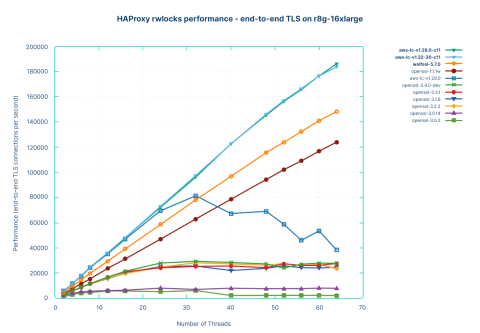
Pendant des années, OpenSSL a été la norme pour SSL/TLS. Cependant, des modifications récentes apportées à OpenSSL 3.x ont introduit des régressions de performances dans les environnements multithread, créant ainsi des goulots d'étranglement pour les équilibreurs de charge à haut débit.
Pour résoudre ce problème, nous avons conçu ces packages pour utiliser AWS-LC, une bibliothèque cryptographique haute performance dérivée de BoringSSL.
Optimisé pour l'efficacité : récupérer les cycles CPU perdus à cause des conflits de verrouillage.
Prêt pour la production : nous gérons la compilation complexe et la gestion des dépendances afin que vous puissiez installer via apt ou yum comme d’habitude.
Gérez, sécurisez et surveillez l'ensemble de votre trafic grâce à une plateforme unifiée.
HAProxy Community Edition est rapide, flexible et fiable. Mais à mesure que votre entreprise se développe, vos besoins en matière de diffusion d'applications peuvent évoluer.
HAProxy One combine le noyau open source que vous connaissez avec les fonctionnalités d'entreprise nécessaires pour alimenter les applications critiques des organisations les plus exigeantes au monde.
Si vous avez besoin d'une sécurité sans compromis
Accédez au HAProxy Enterprise WAF (alimenté par le moteur WAF intelligent) et au module de gestion des bots d'entreprise HAProxy pour stopper les menaces à la périphérie avec une précision exceptionnelle et une latence ultra-faible.
Si vous avez besoin de stabilité et de conformité
Bénéficiez de versions à support à long terme (LTS), de modules de cryptographie conformes à la norme FIPS et d'un support technique primé 24h/24 et 7j/7 assuré par les ingénieurs experts à l'origine de HAProxy.
Si vous avez besoin de gestion et d'observabilité à grande échelle
Le contrôle unifié via HAProxy Fusion Control Plane offre une gestion centralisée, une observabilité et une automatisation pour les déploiements multi-clusters, multi-cloud et multi-équipes.