High availability
Configure two HAProxy Enterprise servers for active/standby clustering
This page applies to:
- HAProxy Enterprise - all versions
Using HAProxy Fusion?
If you’re using HAProxy Fusion, then see the HAProxy Fusion - High availability topic instead.
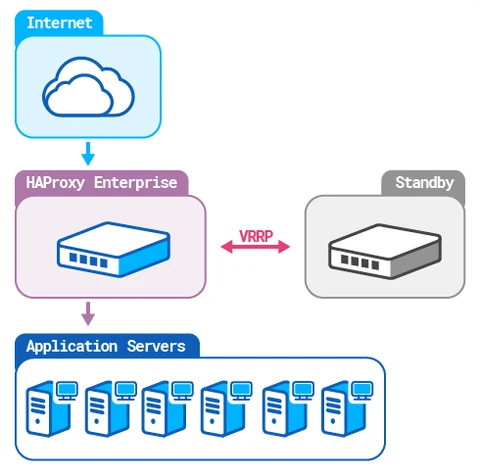
In an active-standby cluster, one HAProxy Enterprise node receives traffic while a second node is put on standby. In case the active node fails, the standby takes over. With HAProxy Enterprise, you configure an active-standby cluster by installing the Virtual Router Redundancy Protocol (VRRP) module.
The HAProxy Enterprise VRRP module assigns a virtual, static IP address to your load balancer node. If the node fails, the IP address will instantly transfer to a backup node, avoiding any break in service. Your router can continue to send traffic to the same IP address for the load balancer, never knowing that there was a failover. The module utilizes a stable version of Keepalived, which implements VRRP.
In this guide, we will set up two load balancers: one active and the other on standby.
Prerequisites Jump to heading
Multicast capability required
VRRP requires multicast capability. However, some environments, such as AWS, may not allow multicasting. In these environments, you may have to configure a unicast implementation instead or use some other solution besides VRRP.If you have a firewall running on the server, such as firewalld (the default on Red Hat Enterprise Linux) or iptables, then be sure to add an exception for VRRP traffic.
Add an exception to firewalld
To add an exception for VRRP to firewalld:
-
Check if
firewalldis running:nixsudo firewall-cmd --statenixsudo firewall-cmd --stateoutputrunningoutputrunning -
Check which
firewalldzones are active for your network interfaces. Below, our active zone is namedpublic:nixsudo firewall-cmd --get-active-zonesnixsudo firewall-cmd --get-active-zonesoutputpublic interfaces: eth0 eth1outputpublic interfaces: eth0 eth1 -
To ensure that existing runtime rules (those that are in effect) are persisted, save them as permanent before going further:
nixsudo firewall-cmd --runtime-to-permanentnixsudo firewall-cmd --runtime-to-permanentoutputsuccessoutputsuccess -
Add the VRRP protocol to the list of rules. Below, we use the zone named
public:nixsudo firewall-cmd --zone=public --add-protocol=vrrp --permanentsudo firewall-cmd --reloadnixsudo firewall-cmd --zone=public --add-protocol=vrrp --permanentsudo firewall-cmd --reloadoutputsuccessoutputsuccess -
Verify that the protocol has been added. Below, we use the zone named
public:nixsudo firewall-cmd --zone=public --list-all | grep vrrpnixsudo firewall-cmd --zone=public --list-all | grep vrrpprotocols: vrrpprotocols: vrrp -
Make these changes persist:
nixsudo firewall-cmd --runtime-to-permanentnixsudo firewall-cmd --runtime-to-permanentoutputsuccessoutputsuccess -
If you need to revert this change, run these commands:
nixsudo firewall-cmd --zone=public --remove-protocol=vrrp --permanentsudo firewall-cmd --reloadnixsudo firewall-cmd --zone=public --remove-protocol=vrrp --permanentsudo firewall-cmd --reload
Add an exception to iptables
To add an exception for VRRP to iptables:
-
Save a backup of your current
iptablesconfiguration:nixsudo apt install iptables-persistentsudo su -c 'iptables-save > /etc/iptables.backup.rules'nixsudo apt install iptables-persistentsudo su -c 'iptables-save > /etc/iptables.backup.rules' -
Add the VRRP protocol to the list of rules. Below, we specify the interface
eth0:nixsudo iptables -A INPUT -p vrrp -i eth0 -j ACCEPT && sudo iptables -A OUTPUT -p vrrp -j ACCEPTnixsudo iptables -A INPUT -p vrrp -i eth0 -j ACCEPT && sudo iptables -A OUTPUT -p vrrp -j ACCEPT -
Verify that the protocol number 112 (VRRP) has been added:
nixsudo iptables -nvL | grep 112nixsudo iptables -nvL | grep 112output0 0 ACCEPT 112 -- eth0 * 0.0.0.0/0 0.0.0.0/0 0 0 ACCEPT 112 -- * * 0.0.0.0/0 0.0.0.0/0output0 0 ACCEPT 112 -- eth0 * 0.0.0.0/0 0.0.0.0/0 0 0 ACCEPT 112 -- * * 0.0.0.0/0 0.0.0.0/0 -
Save the configuration:
nixsudo su -c 'iptables-save > /etc/iptables/rules.v4'nixsudo su -c 'iptables-save > /etc/iptables/rules.v4' -
To revert this change, run this command:
nixsudo iptables-restore < /etc/iptables.backup.rulesnixsudo iptables-restore < /etc/iptables.backup.rulesThen save the configuration as in the previous step.
Are you using Cisco ACI (Application Centric Infrastructure) in your setup?
A known issue with Cisco ACI occurs after a failover in which traffic continues to go to the load balancer that was formerly the primary. This can happen when the former primary briefly sends out traffic over old connections, causing Cisco ACI to relearn the VIP back to the former primary. Avoid this issue by disabling the IP Data-plane Learning option under the VRF and enabling GARP-based detection. See the Cisco ACI White Paper for more details.
Installation Jump to heading
Follow the steps on your active and backup load balancers.
Active load balancer Jump to heading
On the active load balancer, follow these steps:
-
Install the VRRP module using your system’s package manager:
Remove the
hapee-extras-vrrppackage if you installed it previously:nixsudo apt remove hapee-extras-vrrpnixsudo apt remove hapee-extras-vrrpInstall the 2.2 version of VRRP:
nixsudo apt-get install hapee-extras-vrrp22nixsudo apt-get install hapee-extras-vrrp22Remove the
hapee-extras-vrrppackage if you installed it previously:nixsudo yum remove hapee-extras-vrrpnixsudo yum remove hapee-extras-vrrpInstall the 2.2 version of VRRP:
nixsudo yum install hapee-extras-vrrp22nixsudo yum install hapee-extras-vrrp22Remove the
hapee-extras-vrrppackage if you installed it previously:nixsudo zypper remove hapee-extras-vrrpnixsudo zypper remove hapee-extras-vrrpInstall the 2.2 version of VRRP:
nixsudo zypper install hapee-extras-vrrp22nixsudo zypper install hapee-extras-vrrp22Remove the
hapee-extras-vrrppackage if you installed it previously:nixsudo pkg delete hapee-extras-vrrpnixsudo pkg delete hapee-extras-vrrpInstall the 2.2 version of VRRP:
nixsudo pkg install hapee-extras-vrrp22nixsudo pkg install hapee-extras-vrrp22 -
Decide on a unique Virtual Router Identifier (VRID) for the cluster. A VRID can be any number between 1 and 255. It allows the instances in a cluster to share a virtual router and virtual IP address. The VRID must be the same on all instances in a cluster. If there are multiple VRRP clusters in the environment, the VRID must be unique for each cluster.
Don’t use a VRID already in use for another cluster. If the
vrrpservice has been started and enabled, you can list VRIDs already in use by executing the following command (substitute your interface foreth0):nixsudo tcpdump -vvvenns0 -c 50 -i eth0 vrrp | grep -o "vrid [0-9]*" | sort -nr | uniqnixsudo tcpdump -vvvenns0 -c 50 -i eth0 vrrp | grep -o "vrid [0-9]*" | sort -nr | uniqoutputtext[...]5 packets captured6 packets received by filter0 packets dropped by kernelvrid 161vrid 155outputtext[...]5 packets captured6 packets received by filter0 packets dropped by kernelvrid 161vrid 155In our example configuration, we will use VRID
51. -
Decide on a password for the cluster. The password is a clear-text string for use by all instances in this VRRP cluster. It doesn’t provide security, but it ensures that VRRP instances from other clusters can’t accidentally join this cluster.
-
Edit the file
/etc/hapee-extras/hapee-vrrp.cfg.-
In the
vrrp_instancesection, change theinterfacevalue frometh0to the name of a network interface that receives traffic on the server. This is the same interface that you the bind HAProxy Enterprise’sfrontendto. For example, if traffic reaches the load balancer using interfaceenp0s8. Set this line tointerface enp0s8. -
For the
virtual_router_idvalue, specify the VRID determined previously. -
Change the authentication password in
auth_passto the password determined previously. If thevrrp_instancesection does not already contain anauthenticationsection, add one:hapee-vrrp.cfgtextvrrp_instance vrrp_1 {authentication {auth_type PASSauth_pass 1234 # Text string unique to this cluster}hapee-vrrp.cfgtextvrrp_instance vrrp_1 {authentication {auth_type PASSauth_pass 1234 # Text string unique to this cluster} -
Change the IP address listed in the
virtual_ipaddress_excludedblock to the virtual IP address you’d like to assign to this interface. HAProxy Enterprise will bind to this address to receive traffic. If needed, add more IP addresses here, each on its own line. The new address(es) should fall within the interface’s IP subnet but shouldn’t already be assigned to any server. -
In the
track_interfaceblock, specify the same interface name that is specified in theinterfacefield.
The full
vrrp_instancesection:hapee-vrrp.cfgtextvrrp_instance vrrp_1 {interface enp0s8 # Change network interface namestate MASTERvirtual_router_id 51 # VRID unique to this clusterauthentication {auth_type PASSauth_pass 1234 # Text string unique to this cluster}priority 101virtual_ipaddress_excluded {192.168.50.10 # New IP address}track_interface {enp0s8 weight -2 # Change network interface name}track_script {chk_sshdchk_lb}}hapee-vrrp.cfgtextvrrp_instance vrrp_1 {interface enp0s8 # Change network interface namestate MASTERvirtual_router_id 51 # VRID unique to this clusterauthentication {auth_type PASSauth_pass 1234 # Text string unique to this cluster}priority 101virtual_ipaddress_excluded {192.168.50.10 # New IP address}track_interface {enp0s8 weight -2 # Change network interface name}track_script {chk_sshdchk_lb}} -
-
Enable and start the
hapee-extras-vrrpservice:nixsudo systemctl unmask hapee-extras-vrrpsudo systemctl enable hapee-extras-vrrpsudo systemctl start hapee-extras-vrrpnixsudo systemctl unmask hapee-extras-vrrpsudo systemctl enable hapee-extras-vrrpsudo systemctl start hapee-extras-vrrp -
Allow the server to bind to the virtual IP address.
Edit the file
/etc/sysctl.confand add thenet.ipv4.ip_nonlocal_bind=1directive. This directive allows the server to accept connections for IP addresses that aren’t bound to any of its interfaces, enabling the use of a floating, virtual IP.sysctl.confininet.ipv4.ip_nonlocal_bind=1sysctl.confininet.ipv4.ip_nonlocal_bind=1 -
Configure your
bindline in the HAProxy Enterprise configuration to use the virtual IP address.haproxyfrontend myfrontendmode httpbind 192.168.50.10:80default_backend web_servershaproxyfrontend myfrontendmode httpbind 192.168.50.10:80default_backend web_servers -
Reboot the server.
Standby load balancer Jump to heading
On the standby load balancer, follow these steps:
-
Install the VRRP module using your system’s package manager:
Remove the
hapee-extras-vrrppackage if you installed it previously:nixsudo apt remove hapee-extras-vrrpnixsudo apt remove hapee-extras-vrrpInstall the 2.2 version of VRRP:
nixsudo apt-get install hapee-extras-vrrp22nixsudo apt-get install hapee-extras-vrrp22Remove the
hapee-extras-vrrppackage if you installed it previously:nixsudo yum remove hapee-extras-vrrpnixsudo yum remove hapee-extras-vrrpInstall the 2.2 version of VRRP:
nixsudo yum install hapee-extras-vrrp22nixsudo yum install hapee-extras-vrrp22Remove the
hapee-extras-vrrppackage if you installed it previously:nixsudo zypper remove hapee-extras-vrrpnixsudo zypper remove hapee-extras-vrrpInstall the 2.2 version of VRRP:
nixsudo zypper install hapee-extras-vrrp22nixsudo zypper install hapee-extras-vrrp22Remove the
hapee-extras-vrrppackage if you installed it previously:nixsudo pkg delete hapee-extras-vrrpnixsudo pkg delete hapee-extras-vrrpInstall the 2.2 version of VRRP:
nixsudo pkg install hapee-extras-vrrp22nixsudo pkg install hapee-extras-vrrp22 -
Edit the VRRP configuration
/etc/hapee-extras/hapee-vrrp.cfg. It must be exactly the same as the file on the active load balancer, except for these differences:-
In the
vrrp_instanceblock, change theinterfacevalue to the name of the network interface that receives traffic on the server. -
Change the
statevalue toBACKUP. -
For the
virtual_router_idvalue, specify the VRID determined previously. -
Change the authentication password in
auth_passto the password determined previously. If thevrrp_instancesection does not already contain anauthenticationsection, add one:hapee-vrrp.cfgtextvrrp_instance vrrp_1 {authentication {auth_type PASSauth_pass 1234 # Text string unique to this cluster}hapee-vrrp.cfgtextvrrp_instance vrrp_1 {authentication {auth_type PASSauth_pass 1234 # Text string unique to this cluster} -
Change the
priorityfield to have a lower number than the active node. The load balancer with the highest priority is promoted to be the active node. For example, if the priority on the active node is 101, then set the backup node’s priority to 100. -
In the
track_interfaceblock, specify the same interface name that is specified in theinterfacefield.
hapee-vrrp.cfgtextvrrp_instance vrrp_1 {interface enp0s8 # Change network interface namestate BACKUP # Change to BACKUPvirtual_router_id 51authentication {auth_type PASSauth_pass 1234}priority 100 # A lower priority value than the primaryvirtual_ipaddress_excluded {192.168.50.10 # Same IP address as on primary}track_interface {enp0s8 weight -2 # Change network interface name}track_script {chk_sshdchk_lb}}hapee-vrrp.cfgtextvrrp_instance vrrp_1 {interface enp0s8 # Change network interface namestate BACKUP # Change to BACKUPvirtual_router_id 51authentication {auth_type PASSauth_pass 1234}priority 100 # A lower priority value than the primaryvirtual_ipaddress_excluded {192.168.50.10 # Same IP address as on primary}track_interface {enp0s8 weight -2 # Change network interface name}track_script {chk_sshdchk_lb}} -
-
Enable and start the
hapee-extras-vrrpservice:nixsudo systemctl unmask hapee-extras-vrrpsudo systemctl enable hapee-extras-vrrpsudo systemctl start hapee-extras-vrrpnixsudo systemctl unmask hapee-extras-vrrpsudo systemctl enable hapee-extras-vrrpsudo systemctl start hapee-extras-vrrp -
Allow the server to bind to the virtual IP address.
Edit the file
/etc/sysctl.confand add thenet.ipv4.ip_nonlocal_bind=1directive. This directive allows the server to accept connections for IP addresses that aren’t bound to any of its interfaces, enabling the use of a floating, virtual IP.sysctl.confininet.ipv4.ip_nonlocal_bind=1sysctl.confininet.ipv4.ip_nonlocal_bind=1 -
Configure your
bindline in the HAProxy Enterprise configuration to use the virtual IP address.haproxyfrontend myfrontendmode httpbind 192.168.50.10:80default_backend web_servershaproxyfrontend myfrontendmode httpbind 192.168.50.10:80default_backend web_servers -
Reboot the server.
Verify the setup Jump to heading
To check that the VRRP service is running, use systemctl status:
nix
nix
outputtext
outputtext
Manual failover Jump to heading
To activate the standby load balancer while simultaneously putting the active load balancer into standby mode:
-
Edit the VRRP configuration
/etc/hapee-extras/hapee-vrrp.cfgon the active (current master) load balancer. -
Lower the
priorityvalue to less than the standby load balancer’spriority. This will put the active load balancer into the standby state and simultaneously activate the standby load balancer. For example, change it from 101 to 90. -
Restart the
hapee-extras-vrrpservice.nixsudo systemctl restart hapee-extras-vrrpnixsudo systemctl restart hapee-extras-vrrp
Reverse these actions to restore the original state.
Failover triggers Jump to heading
The following events can trigger a failover:
- The active node lowers its weight below one of the backup nodes due to a failed health check.
- A backup node is reconfigured with a weight larger than the current active node.
- The active node stops emitting its heartbeat packet to the cluster.
VRRP health check scripts Jump to heading
In the VRRP configuration, the vrrp_script blocks define health checks that can trigger a failover. By default, our configuration checks whether the SSH daemon is running and whether HAProxy Enterprise is running. You may want to add more checks.
Consider this block, which checks the status of the SSH daemon every five seconds. If the service isn’t available, the VRRP instance’s weight (its priority) is reduced by 4 points:
hapee-vrrp.cfgtext
hapee-vrrp.cfgtext
The HAProxy Enterprise health check is similar, except if the hapee-lb process is running, it adds 6 points. The reason is, in case one load balancer has SSH working but not hapee-lb, while the other has hapee-lb but not SSH, the one with hapee-lb will become the active node, even though it isn’t manageable remotely.
hapee-vrrp.cfgtext
hapee-vrrp.cfgtext
The following fields define a vrrp_script block:
| Name | Argument type | Description |
|---|---|---|
script |
string | Command to run. Running pkill -0 checks if any process with the given name is running. If it returns 0, the check passes; if it returns 1, the check fails. |
interval |
integer | Interval (in seconds) between two checks. |
weight |
integer | Points to add or remove to instance weight. |
fall |
integer | Number of consecutive negative checks before considered as down. |
rise |
integer | Number of consecutive positive checks before considered as up. |
Monitor with SNMP Jump to heading
This section applies to
- HAProxy Enterprise 3.4r1 and newer
The HAProxy Enterprise VRRP module exposes metrics that your network monitoring software can poll for at an interval, via Simple Network Management Protocol (SNMP). It also supports SNMP traps, which are alerts the module sends to the monitoring software without waiting for the next round of polling. SNMP traps apply to critical events.
Enable SNMP in the module Jump to heading
Perform these steps on all HAProxy Enterprise servers in the cluster to enable the VRRP module’s SNMP metrics:
-
On the HAProxy Enterprise server, install the SNMP agent software, which returns metrics when queried by the network monitoring software. We’ll also install the SNMP client utilities, which provides tools like
snmpusmfor creating SNMPv3 user accounts, andsnmpwalkfor making ad hoc queries.nixsudo apt updatesudo apt install snmpd snmpnixsudo apt updatesudo apt install snmpd snmpnixsudo yum install net-snmp net-snmp-utilsnixsudo yum install net-snmp net-snmp-utils -
Create the
snmpgroup.nixsudo groupadd -r snmpnixsudo groupadd -r snmp -
Edit the SNMP agent’s configuration file,
/etc/snmp/snmpd.conf.-
Enable the AgentX protocol, which allows the agent to be extended with new management objects, in this case for VRRP. Add these lines if they’re missing:
snmpd.conftextmaster agentxagentXSocket /var/agentx/masteragentXPerms 0660 0550 nobody snmpsnmpd.conftextmaster agentxagentXSocket /var/agentx/masteragentXPerms 0660 0550 nobody snmp -
If there’s an
agentaddressline that’s set to127.0.0.1,[::1], comment it out by prefixing it with a hash sign. This changes the agent to listen for traffic on all IP addresses, not just the loopback address.snmpd.conftext# agentaddress 127.0.0.1,[::1]snmpd.conftext# agentaddress 127.0.0.1,[::1] -
Configure SNMPv3 access. Add the following
createUserandrwuserlines to the end of the file to create an initial user account with read-write access. Note that this applies to SNMPv3 only, since older versions of the protocol don’t require user accounts and instead use a community string for authentication. This initial user account will become the template from which we will create other user accounts.snmpd.conftextcreateUser initial SHA setup_passphrase AES setup_passphraserwuser initialsnmpd.conftextcreateUser initial SHA setup_passphrase AES setup_passphraserwuser initial -
Add another
rwuserline to prepare a second user account with read-write access. Below, we define permissions for a user namedmyuser:snmpd.conftextrwuser myusersnmpd.conftextrwuser myuser
Save and exit the file.
-
-
Start the SNMP agent service:
nixsudo systemctl start snmpdnixsudo systemctl start snmpd -
Using the
initialuser’s username and passphrase, create a new user account that you’ll use to make SNMP requests. This user will inherit settings from theinitialuser account. Below, we create a user namedmyuser:nixsnmpusm -v3 -n "" -u initial -a SHA -A setup_passphrase -x AES -X setup_passphrase -l authPriv 127.0.0.1 create myuser initialnixsnmpusm -v3 -n "" -u initial -a SHA -A setup_passphrase -x AES -X setup_passphrase -l authPriv 127.0.0.1 create myuser initialoutputtextUser successfully created.outputtextUser successfully created. -
The new user account inherited the passphrase from the
initialuser account. Use thesnmpusmcommand again to change the user’s passphrase. Below, we change themyuseruser account’s passphrase tomypassword. In a production environment, be sure to use a strong password.nixsnmpusm -v3 -n "" -u myuser -a SHA -A setup_passphrase -x AES -X setup_passphrase -l authPriv 127.0.0.1 passwd setup_passphrase mypasswordnixsnmpusm -v3 -n "" -u myuser -a SHA -A setup_passphrase -x AES -X setup_passphrase -l authPriv 127.0.0.1 passwd setup_passphrase mypasswordoutputtextSNMPv3 Key(s) successfully changed.outputtextSNMPv3 Key(s) successfully changed. -
Edit the VRRP module’s configuration file,
/etc/hapee-extras/hapee-vrrp.cfg. Add thisglobal_defssection to the top of the file to enable SNMP metrics.hapee-vrrp.cfgtextglobal_defs {enable_snmp_rfcv3 # enable SNMP handling of RFC6527 VRRP MIBenable_snmp_vrrp # enable SNMP handling of vrrp element of KEEPALIVED MIBenable_traps # enable SNMP traps}hapee-vrrp.cfgtextglobal_defs {enable_snmp_rfcv3 # enable SNMP handling of RFC6527 VRRP MIBenable_snmp_vrrp # enable SNMP handling of vrrp element of KEEPALIVED MIBenable_traps # enable SNMP traps} -
Restart the
hapee-extras-vrrpservice:nixsudo systemctl restart hapee-extras-vrrpnixsudo systemctl restart hapee-extras-vrrp -
Check the status of the service. It should show
Sending SNMP notification.nixsudo systemctl status hapee-extras-vrrpnixsudo systemctl status hapee-extras-vrrpoutputtextSep 29 18:44:29 lb1 Keepalived_vrrp[15927]: (vrrp_1) Sending SNMP notificationoutputtextSep 29 18:44:29 lb1 Keepalived_vrrp[15927]: (vrrp_1) Sending SNMP notification
Get metrics Jump to heading
To verify that you’ve set up the VRRP module for SNMP, we’ll install SNMP tools on a remote host and fetch metrics.
On the remote host:
-
Install the SNMP client utilities, which provides tools like
snmpwalkfor making ad hoc queries.nixsudo apt updatesudo apt install snmpnixsudo apt updatesudo apt install snmpnixsudo yum install net-snmp-utilsnixsudo yum install net-snmp-utils -
On Debian and Ubuntu only, perform these steps:
-
Configure the management software to load Management Information Bases (MIBs) by editing the file
/etc/snmp/snmp.confand commenting out themibsline so that it looks like this:snmp.conftext# mibs :snmp.conftext# mibs : -
Locate the
mibdirsline. If it is commented out, uncomment it.snmp.conftextmibdirs /usr/share/snmp/mibs:/usr/share/snmp/mibs/iana:/usr/share/snmp/mibs/ietfsnmp.conftextmibdirs /usr/share/snmp/mibs:/usr/share/snmp/mibs/iana:/usr/share/snmp/mibs/ietf -
To install
snmp-mibs-downloader, you need thenon-freerepository. Open/etc/apt/sources.list. If all content has been commented out and it says sources have been moved to/etc/apt/sources.list.d/ubuntu.sources, you don’t need to change apt source declarations. On the other hand, if thesources.listfile contains an uncommented source declaration, append thenon-freerepository to the declaration:sources.listtextdeb https://deb.debian.org/debian bookworm main non-freesources.listtextdeb https://deb.debian.org/debian bookworm main non-free -
Add the MIB files by installing the
snmp-mibs-downloaderpackage:nixsudo apt updatesudo apt install snmp-mibs-downloadernixsudo apt updatesudo apt install snmp-mibs-downloader
-
-
To verify that the user you created can make requests to the agent software, you can use the management software’s
snmpgetcommand to fetch some metrics. Try the following, but replace<LB-IP-ADDRESS>with your load balancer’s IP address.nixsnmpget -v3 -n "" -u myuser -a SHA -A mypassword -x AES -X mypassword -l authPriv <LB-IP-ADDRESS> sysUpTime.0nixsnmpget -v3 -n "" -u myuser -a SHA -A mypassword -x AES -X mypassword -l authPriv <LB-IP-ADDRESS> sysUpTime.0outputtextDISMAN-EVENT-MIB::sysUpTimeInstance = Timeticks: (34926) 0:05:49.26outputtextDISMAN-EVENT-MIB::sysUpTimeInstance = Timeticks: (34926) 0:05:49.26 -
Install the Keepalived MIB file by downloading it to the
mibsdirectory. A MIB (management information base) allows SNMP to return readable names instead of long strings of numbers (OIDs).nixsudo curl https://raw.githubusercontent.com/acassen/keepalived/refs/heads/master/doc/KEEPALIVED-MIB.txt -o /usr/share/snmp/mibs/KEEPALIVED-MIB.txtnixsudo curl https://raw.githubusercontent.com/acassen/keepalived/refs/heads/master/doc/KEEPALIVED-MIB.txt -o /usr/share/snmp/mibs/KEEPALIVED-MIB.txt -
Use the
snmpwalkcommand to fetch metrics for thevrrpobject.In these examples, replace
<LB-IP-ADDRESS>with your load balancer’s IP address.nixsnmpwalk -v3 -u myuser -a SHA -A mypassword -x AES -X mypassword -l authPriv <LB-IP-ADDRESS> KEEPALIVED-MIB::vrrpnixsnmpwalk -v3 -u myuser -a SHA -A mypassword -x AES -X mypassword -l authPriv <LB-IP-ADDRESS> KEEPALIVED-MIB::vrrpoutputtextKEEPALIVED-MIB::vrrpInstanceName.1 = STRING: vrrp_1KEEPALIVED-MIB::vrrpInstanceVirtualRouterId.1 = Gauge32: 51KEEPALIVED-MIB::vrrpInstanceState.1 = INTEGER: master(2)KEEPALIVED-MIB::vrrpInstanceInitialState.1 = INTEGER: master(2)KEEPALIVED-MIB::vrrpInstanceWantedState.1 = INTEGER: master(2)KEEPALIVED-MIB::vrrpInstanceBasePriority.1 = INTEGER: 101KEEPALIVED-MIB::vrrpInstanceEffectivePriority.1 = INTEGER: 107KEEPALIVED-MIB::vrrpInstanceVipsStatus.1 = INTEGER: allSet(1)KEEPALIVED-MIB::vrrpInstancePrimaryInterface.1 = STRING: eth1KEEPALIVED-MIB::vrrpInstanceTrackPrimaryIf.1 = INTEGER: notTracked(2)KEEPALIVED-MIB::vrrpInstanceAdvertisementsInt.1 = Gauge32: 1 seconds(VRRPv2) / centiseconds(VRRPv3)KEEPALIVED-MIB::vrrpInstancePreempt.1 = INTEGER: preempt(1)KEEPALIVED-MIB::vrrpInstancePreemptDelay.1 = Gauge32: 0 secondsKEEPALIVED-MIB::vrrpInstanceAuthType.1 = INTEGER: password(1)KEEPALIVED-MIB::vrrpInstanceGarpDelay.1 = Gauge32: 5 secondsKEEPALIVED-MIB::vrrpInstanceSmtpAlert.1 = INTEGER: disabled(2)KEEPALIVED-MIB::vrrpInstanceNotifyExec.1 = INTEGER: disabled(2)KEEPALIVED-MIB::vrrpInstanceAccept.1 = INTEGER: 0KEEPALIVED-MIB::vrrpInstancePromoteSecondaries.1 = INTEGER: false(2)KEEPALIVED-MIB::vrrpInstanceUseLinkbeat.1 = INTEGER: false(2)KEEPALIVED-MIB::vrrpInstanceVrrpVersion.1 = INTEGER: vrrpv2(2)KEEPALIVED-MIB::vrrpInstanceNotifyDeleted.1 = INTEGER: false(2)KEEPALIVED-MIB::vrrpInstanceMulticastAddressType.1 = INTEGER: ipv4(1)KEEPALIVED-MIB::vrrpInstanceMulticastAddress.1 = Hex-STRING: E0 00 00 12KEEPALIVED-MIB::vrrpTrackedScriptName.1.1 = STRING: chk_sshdKEEPALIVED-MIB::vrrpTrackedScriptName.1.2 = STRING: chk_lbKEEPALIVED-MIB::vrrpTrackedScriptWeight.1.1 = INTEGER: -4KEEPALIVED-MIB::vrrpTrackedScriptWeight.1.2 = INTEGER: 6KEEPALIVED-MIB::vrrpTrackedScriptWgtRev.1.1 = INTEGER: false(2)KEEPALIVED-MIB::vrrpTrackedScriptWgtRev.1.2 = INTEGER: false(2)KEEPALIVED-MIB::vrrpAddressType.1.1 = INTEGER: ipv4(1)KEEPALIVED-MIB::vrrpAddressValue.1.1 = Hex-STRING: C0 A8 38 1EKEEPALIVED-MIB::vrrpAddressBroadcast.1.1 = Hex-STRING: 00 00 00 00KEEPALIVED-MIB::vrrpAddressMask.1.1 = Gauge32: 32KEEPALIVED-MIB::vrrpAddressScope.1.1 = INTEGER: global(14)KEEPALIVED-MIB::vrrpAddressIfIndex.1.1 = INTEGER: 3KEEPALIVED-MIB::vrrpAddressIfName.1.1 = STRING: eth1KEEPALIVED-MIB::vrrpAddressStatus.1.1 = INTEGER: set(1)KEEPALIVED-MIB::vrrpAddressAdvertising.1.1 = INTEGER: notAdvertised(2)KEEPALIVED-MIB::vrrpScriptName.1 = STRING: chk_sshdKEEPALIVED-MIB::vrrpScriptName.2 = STRING: chk_lbKEEPALIVED-MIB::vrrpScriptCommand.1 = STRING: '/usr/bin/pkill' '-0' 'sshd'KEEPALIVED-MIB::vrrpScriptCommand.2 = STRING: '/usr/bin/pkill' '-0' 'hapee-lb'KEEPALIVED-MIB::vrrpScriptInterval.1 = INTEGER: 5 secondsKEEPALIVED-MIB::vrrpScriptInterval.2 = INTEGER: 1 secondsKEEPALIVED-MIB::vrrpScriptWeight.1 = INTEGER: -4KEEPALIVED-MIB::vrrpScriptWeight.2 = INTEGER: 6KEEPALIVED-MIB::vrrpScriptResult.1 = INTEGER: good(3)KEEPALIVED-MIB::vrrpScriptResult.2 = INTEGER: good(3)KEEPALIVED-MIB::vrrpScriptRise.1 = Gauge32: 1KEEPALIVED-MIB::vrrpScriptRise.2 = Gauge32: 1KEEPALIVED-MIB::vrrpScriptFall.1 = Gauge32: 2KEEPALIVED-MIB::vrrpScriptFall.2 = Gauge32: 2KEEPALIVED-MIB::vrrpScriptWgtRev.1 = INTEGER: false(2)KEEPALIVED-MIB::vrrpScriptWgtRev.2 = INTEGER: false(2)outputtextKEEPALIVED-MIB::vrrpInstanceName.1 = STRING: vrrp_1KEEPALIVED-MIB::vrrpInstanceVirtualRouterId.1 = Gauge32: 51KEEPALIVED-MIB::vrrpInstanceState.1 = INTEGER: master(2)KEEPALIVED-MIB::vrrpInstanceInitialState.1 = INTEGER: master(2)KEEPALIVED-MIB::vrrpInstanceWantedState.1 = INTEGER: master(2)KEEPALIVED-MIB::vrrpInstanceBasePriority.1 = INTEGER: 101KEEPALIVED-MIB::vrrpInstanceEffectivePriority.1 = INTEGER: 107KEEPALIVED-MIB::vrrpInstanceVipsStatus.1 = INTEGER: allSet(1)KEEPALIVED-MIB::vrrpInstancePrimaryInterface.1 = STRING: eth1KEEPALIVED-MIB::vrrpInstanceTrackPrimaryIf.1 = INTEGER: notTracked(2)KEEPALIVED-MIB::vrrpInstanceAdvertisementsInt.1 = Gauge32: 1 seconds(VRRPv2) / centiseconds(VRRPv3)KEEPALIVED-MIB::vrrpInstancePreempt.1 = INTEGER: preempt(1)KEEPALIVED-MIB::vrrpInstancePreemptDelay.1 = Gauge32: 0 secondsKEEPALIVED-MIB::vrrpInstanceAuthType.1 = INTEGER: password(1)KEEPALIVED-MIB::vrrpInstanceGarpDelay.1 = Gauge32: 5 secondsKEEPALIVED-MIB::vrrpInstanceSmtpAlert.1 = INTEGER: disabled(2)KEEPALIVED-MIB::vrrpInstanceNotifyExec.1 = INTEGER: disabled(2)KEEPALIVED-MIB::vrrpInstanceAccept.1 = INTEGER: 0KEEPALIVED-MIB::vrrpInstancePromoteSecondaries.1 = INTEGER: false(2)KEEPALIVED-MIB::vrrpInstanceUseLinkbeat.1 = INTEGER: false(2)KEEPALIVED-MIB::vrrpInstanceVrrpVersion.1 = INTEGER: vrrpv2(2)KEEPALIVED-MIB::vrrpInstanceNotifyDeleted.1 = INTEGER: false(2)KEEPALIVED-MIB::vrrpInstanceMulticastAddressType.1 = INTEGER: ipv4(1)KEEPALIVED-MIB::vrrpInstanceMulticastAddress.1 = Hex-STRING: E0 00 00 12KEEPALIVED-MIB::vrrpTrackedScriptName.1.1 = STRING: chk_sshdKEEPALIVED-MIB::vrrpTrackedScriptName.1.2 = STRING: chk_lbKEEPALIVED-MIB::vrrpTrackedScriptWeight.1.1 = INTEGER: -4KEEPALIVED-MIB::vrrpTrackedScriptWeight.1.2 = INTEGER: 6KEEPALIVED-MIB::vrrpTrackedScriptWgtRev.1.1 = INTEGER: false(2)KEEPALIVED-MIB::vrrpTrackedScriptWgtRev.1.2 = INTEGER: false(2)KEEPALIVED-MIB::vrrpAddressType.1.1 = INTEGER: ipv4(1)KEEPALIVED-MIB::vrrpAddressValue.1.1 = Hex-STRING: C0 A8 38 1EKEEPALIVED-MIB::vrrpAddressBroadcast.1.1 = Hex-STRING: 00 00 00 00KEEPALIVED-MIB::vrrpAddressMask.1.1 = Gauge32: 32KEEPALIVED-MIB::vrrpAddressScope.1.1 = INTEGER: global(14)KEEPALIVED-MIB::vrrpAddressIfIndex.1.1 = INTEGER: 3KEEPALIVED-MIB::vrrpAddressIfName.1.1 = STRING: eth1KEEPALIVED-MIB::vrrpAddressStatus.1.1 = INTEGER: set(1)KEEPALIVED-MIB::vrrpAddressAdvertising.1.1 = INTEGER: notAdvertised(2)KEEPALIVED-MIB::vrrpScriptName.1 = STRING: chk_sshdKEEPALIVED-MIB::vrrpScriptName.2 = STRING: chk_lbKEEPALIVED-MIB::vrrpScriptCommand.1 = STRING: '/usr/bin/pkill' '-0' 'sshd'KEEPALIVED-MIB::vrrpScriptCommand.2 = STRING: '/usr/bin/pkill' '-0' 'hapee-lb'KEEPALIVED-MIB::vrrpScriptInterval.1 = INTEGER: 5 secondsKEEPALIVED-MIB::vrrpScriptInterval.2 = INTEGER: 1 secondsKEEPALIVED-MIB::vrrpScriptWeight.1 = INTEGER: -4KEEPALIVED-MIB::vrrpScriptWeight.2 = INTEGER: 6KEEPALIVED-MIB::vrrpScriptResult.1 = INTEGER: good(3)KEEPALIVED-MIB::vrrpScriptResult.2 = INTEGER: good(3)KEEPALIVED-MIB::vrrpScriptRise.1 = Gauge32: 1KEEPALIVED-MIB::vrrpScriptRise.2 = Gauge32: 1KEEPALIVED-MIB::vrrpScriptFall.1 = Gauge32: 2KEEPALIVED-MIB::vrrpScriptFall.2 = Gauge32: 2KEEPALIVED-MIB::vrrpScriptWgtRev.1 = INTEGER: false(2)KEEPALIVED-MIB::vrrpScriptWgtRev.2 = INTEGER: false(2) -
Configure your SNMP monitoring software to collect metrics from the HAProxy Enterprise server by using the SNMPv3 protocol with the username and passphrase you set.
Receive trap messages Jump to heading
After you’ve configured the remote server to get metrics, you can prepare it to receive SNMP trap messages:
-
On the HAProxy Enterprise server, edit the SNMP agent’s configuration file,
/etc/snmp/snmpd.conf, and add atrapsessdirective that sets the IP address of the remote server where you’ll send trap messages. Replace<REMOTE-IP>with the IP address of the server that receives trap messages.snmpd.conftexttrapsess -v3 -l authPriv -u myuser -a SHA -A mypassword -x AES -X mypassword <REMOTE-IP>snmpd.conftexttrapsess -v3 -l authPriv -u myuser -a SHA -A mypassword -x AES -X mypassword <REMOTE-IP> -
Restart the SNMP agent service:
nixsudo systemctl restart snmpdnixsudo systemctl restart snmpd -
On the remote host, install the
snmptrapdpackage to get the snmptrapd application, which receives and logs SNMP trap messages.nixsudo apt updatesudo apt install snmptrapdnixsudo apt updatesudo apt install snmptrapdnixsudo yum install net-snmp net-snmp-utilsnixsudo yum install net-snmp net-snmp-utils -
Edit the snmptrapd systemd unit file.
nixsudo systemctl edit snmptrapdnixsudo systemctl edit snmptrapdAdd
-m ALLto theExecStartline to load all MIB files.snmptrapd.serviceini[Unit]Description=Simple Network Management Protocol (SNMP) Trap Daemon.[Service]Type=notifyUser=Debian-snmpExecStart=/usr/sbin/snmptrapd -LOw -f udp:162 udp6:162 -m ALLExecReload=/bin/kill -HUP $MAINPIDsnmptrapd.serviceini[Unit]Description=Simple Network Management Protocol (SNMP) Trap Daemon.[Service]Type=notifyUser=Debian-snmpExecStart=/usr/sbin/snmptrapd -LOw -f udp:162 udp6:162 -m ALLExecReload=/bin/kill -HUP $MAINPIDSave and exit.
-
Reload the systemd daemon.
nixsudo systemctl daemon-reloadnixsudo systemctl daemon-reload -
Create a custom script to handle notifications when they arrive. For example, the script below writes the notification messages to a file:
logtrap.sh#!/bin/bash STDIN=$(cat) FILE=/tmp/trap-messages.txt TIMESTAMP=$(date +"%Y-%m-%d %T") echo "Time: $TIMESTAMP" >> $FILE echo $STDIN >> $FILElogtrap.sh#!/bin/bash STDIN=$(cat) FILE=/tmp/trap-messages.txt TIMESTAMP=$(date +"%Y-%m-%d %T") echo "Time: $TIMESTAMP" >> $FILE echo $STDIN >> $FILE -
Save this as
/usr/local/bin/logtrap.shand make it executable:nixsudo cp logtrap.sh /usr/local/bin/sudo chmod +x /usr/local/bin/logtrap.shnixsudo cp logtrap.sh /usr/local/bin/sudo chmod +x /usr/local/bin/logtrap.sh -
For each HAProxy Enterprise server, use the
snmpgetcommand to get the SNMP EngineID, which returns a hex string that’s unique to that server. Replace<REMOTE-IP>.nixsnmpget -v3 -n "" -u myuser -a SHA -A mypassword -x AES -X mypassword -l authPriv <REMOTE-IP> SNMP-FRAMEWORK-MIB::snmpEngineID.0nixsnmpget -v3 -n "" -u myuser -a SHA -A mypassword -x AES -X mypassword -l authPriv <REMOTE-IP> SNMP-FRAMEWORK-MIB::snmpEngineID.0The EngineID is
0x80001F88802790C035B925BC6A00000000. Note that the output can wrap onto a new line, as in this example.outputtextSNMP-FRAMEWORK-MIB::snmpEngineID.0 = Hex-STRING: 80 00 1F 88 80 27 90 C0 35 B9 25 BC 6A 00 00 0000outputtextSNMP-FRAMEWORK-MIB::snmpEngineID.0 = Hex-STRING: 80 00 1F 88 80 27 90 C0 35 B9 25 BC 6A 00 00 0000Do this for both HAProxy Enterprise servers, since each has a unique EngineID.
-
Edit
/etc/snmp/snmptrapd.conf.-
Add
createUserandauthuserdirectives to set SNMPv3 user credentials for authenticating to the HAProxy Enterprise’s VRRP module.snmptrapd.conftext# SNMPv3 User Configuration# Load balancer 1createUser -e 0x80001F88802790C035B925BC6A00000000 myuser SHA mypassword AES mypassword# Load balancer 2createUser -e 0x80001F8880EA93A91E0E5EBC6A00000000 myuser SHA mypassword AES mypasswordauthuser log,execute myusersnmptrapd.conftext# SNMPv3 User Configuration# Load balancer 1createUser -e 0x80001F88802790C035B925BC6A00000000 myuser SHA mypassword AES mypassword# Load balancer 2createUser -e 0x80001F8880EA93A91E0E5EBC6A00000000 myuser SHA mypassword AES mypasswordauthuser log,execute myuser -
Add a
traphandledirective to use the example script. Thedefaultargument treats this handler as the default to execute when no othertraphandlehas precedence.snmptrapd.conftexttraphandle default /usr/local/bin/logtrap.shsnmptrapd.conftexttraphandle default /usr/local/bin/logtrap.sh
Save and exit the file.
-
-
Enable and start the service:
nixsudo systemctl enable snmptrapdsudo systemctl start snmptrapdnixsudo systemctl enable snmptrapdsudo systemctl start snmptrapdCheck the
/tmp/trap-messages.txtlog file for new messages. You can trigger messages by triggering a manual failover on the master VRRP instance and then restarting thehapee-extras-vrrpservice.In this example, a failover caused the
vrrpInstanceStatevalue on each load balancer to change. One becamemasterand the other becamebackup.trap-messages.txttextTime: 2026-09-30 15:06:23<UNKNOWN> UDP: [192.168.56.25]:60157->[192.168.56.26]:162 DISMAN-EXPRESSION-MIB::sysUpTimeInstance 0:1:58:31.52 SNMPv2-MIB::snmpTrapOID.0 KEEPALIVED-MIB::vrrpInstanceStateChange KEEPALIVED-MIB::vrrpInstanceName vrrp_1 KEEPALIVED-MIB::vrrpInstanceState shutdown KEEPALIVED-MIB::vrrpInstanceInitialState master KEEPALIVED-MIB::routerId.0 lb1Time: 2026-09-30 15:06:24<UNKNOWN> UDP: [192.168.56.27]:43088->[192.168.56.26]:162 DISMAN-EXPRESSION-MIB::sysUpTimeInstance 0:1:58:12.59 SNMPv2-MIB::snmpTrapOID.0 KEEPALIVED-MIB::vrrpInstanceStateChange KEEPALIVED-MIB::vrrpInstanceName vrrp_1 KEEPALIVED-MIB::vrrpInstanceState master KEEPALIVED-MIB::vrrpInstanceInitialState backup KEEPALIVED-MIB::routerId.0 lb2Time: 2026-09-30 15:06:25<UNKNOWN> UDP: [192.168.56.25]:60157->[192.168.56.26]:162 DISMAN-EXPRESSION-MIB::sysUpTimeInstance 0:1:58:32.68 SNMPv2-MIB::snmpTrapOID.0 KEEPALIVED-MIB::vrrpInstanceStateChange KEEPALIVED-MIB::vrrpInstanceName vrrp_1 KEEPALIVED-MIB::vrrpInstanceState backup KEEPALIVED-MIB::vrrpInstanceInitialState master KEEPALIVED-MIB::routerId.0 lb1trap-messages.txttextTime: 2026-09-30 15:06:23<UNKNOWN> UDP: [192.168.56.25]:60157->[192.168.56.26]:162 DISMAN-EXPRESSION-MIB::sysUpTimeInstance 0:1:58:31.52 SNMPv2-MIB::snmpTrapOID.0 KEEPALIVED-MIB::vrrpInstanceStateChange KEEPALIVED-MIB::vrrpInstanceName vrrp_1 KEEPALIVED-MIB::vrrpInstanceState shutdown KEEPALIVED-MIB::vrrpInstanceInitialState master KEEPALIVED-MIB::routerId.0 lb1Time: 2026-09-30 15:06:24<UNKNOWN> UDP: [192.168.56.27]:43088->[192.168.56.26]:162 DISMAN-EXPRESSION-MIB::sysUpTimeInstance 0:1:58:12.59 SNMPv2-MIB::snmpTrapOID.0 KEEPALIVED-MIB::vrrpInstanceStateChange KEEPALIVED-MIB::vrrpInstanceName vrrp_1 KEEPALIVED-MIB::vrrpInstanceState master KEEPALIVED-MIB::vrrpInstanceInitialState backup KEEPALIVED-MIB::routerId.0 lb2Time: 2026-09-30 15:06:25<UNKNOWN> UDP: [192.168.56.25]:60157->[192.168.56.26]:162 DISMAN-EXPRESSION-MIB::sysUpTimeInstance 0:1:58:32.68 SNMPv2-MIB::snmpTrapOID.0 KEEPALIVED-MIB::vrrpInstanceStateChange KEEPALIVED-MIB::vrrpInstanceName vrrp_1 KEEPALIVED-MIB::vrrpInstanceState backup KEEPALIVED-MIB::vrrpInstanceInitialState master KEEPALIVED-MIB::routerId.0 lb1
VRRP instance reference Jump to heading
The following fields define a vrrp_instance block:
| Name | Argument type | Description |
|---|---|---|
vrrp_instance |
string | Describes a new VRRP instance. |
interface |
string | Interface managed by the VRRP module. |
state |
string | State at startup until VRRP priority negotiation completes. Can be either MASTER or BACKUP. |
virtual_router_id |
integer | VRRP instance identifier, which must be common to all nodes of the same cluster. Each cluster must have a unique ID. The value can range from 1 to 255. |
priority |
integer | Weight of local node in this VRRP instance. NOTE This won’t work on cloud provider networks that disable IP multicast. |
virtual_ipaddress |
string | List of virtual IP addresses to add when the state changes to MASTER or remove when it changes to BACKUP. All VRRP nodes in a cluster must own the same IP. NOTE This won’t work on cloud provider networks that disable IP multicast. |
virtual_ipaddress_excluded |
string | The same as virtual_ipaddress, but IPs aren’t announced in the VRRP heartbeat packet, which reduces bandwidth usage when sending packets. |
track_interface |
string | Tracks interface status and updates priority accordingly. |
track_script |
string | Runs the health check scripts and updates priority accordingly. |
VRRP Troubleshooting Jump to heading
Does a packet capture reveal that packets are reaching the server, but the VRRP service doesn’t receive them?
- Check if there is a firewall running that may be blocking the packets. See Prerequisites.
Are you using Cisco ACI and experiencing traffic routing back to the failed node after a failover?
- Disable the IP Data-plane Learning option under the VRF and enable GARP-based IP move detection mode. See Prerequisites.
You aren’t receiving trap messages
-
Stop the
snmptrapd.serviceandsnmptrapd.socketservices and run snmptrapd interactively to debug.nixsudo systemctl stop snmptrapdsudo systemctl stop snmptrapd.socketsudo snmptrapd -f -Le -c /etc/snmp/snmptrapd.conf -Dread_config,usmnixsudo systemctl stop snmptrapdsudo systemctl stop snmptrapd.socketsudo snmptrapd -f -Le -c /etc/snmp/snmptrapd.conf -Dread_config,usm
See also Jump to heading
The VRRP module is a wrapper around the Keepalived software. The syntax we use is different, but you may still find the Keepalived documentation useful.